

Requires: MA Memberships - Contract Billing module (and OCA Contract, installed by your administrator).
This module connects membership agreements to Odoo's contract billing engine for recurring monthly tuition and one-time enrollment fees.
How billing works
Each billable agreement gets a billing contract linked to the agreement. The contract contains:
|
Line type |
What it bills |
When |
|---|---|---|
|
Monthly Tuition |
Recurring tuition per enrollment (after discounts) |
Every billing day |
|
One-time Fees |
Enrollment/initiation fees and prorated tuition |
At signing |
The billing contact on the agreement is the invoice recipient. Payment terms default to Immediate Payment.
Enabling billing on an agreement
-
Open a Draft agreement with enrollments added
-
Check Enable Billing
-
A draft billing contract is created automatically from the enrollments
-
Open the Billing tab to review and adjust
Complimentary agreements: Billing is not available when Complimentary ($0) is checked.
Billing tab
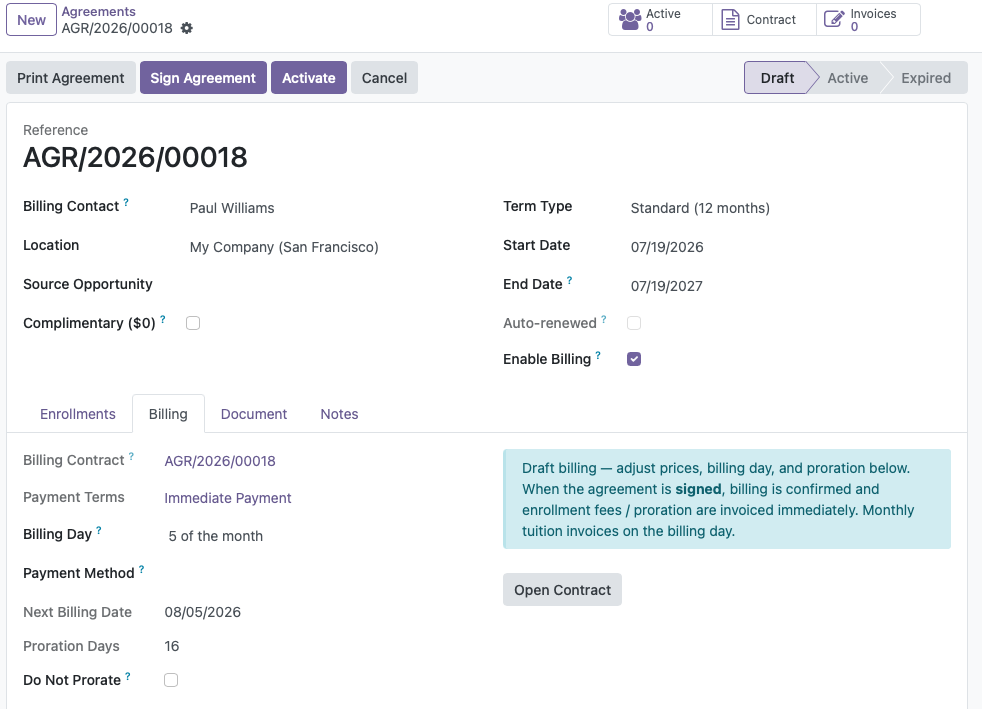
Agreement → Billing tab
Settings
|
Field |
Description |
|---|---|
|
Billing Day |
Day of the month recurring invoices are generated (from your allowed invoice days in Settings) |
|
Next Billing Date |
Calculated next invoice date |
|
Proration Days |
Days from today until first billing date (if proration applies) |
|
Do Not Prorate |
Skip the one-time prorated tuition charge (e.g. to waive partial-month fees) |
Contract lines
Two editable tables appear while billing is still in Draft:
Monthly Tuition - one recurring line per enrollment:
-
Product, description, price, discount
-
Next invoice date
One-time Fees - enrollment fees and proration:
-
Enrollment/initiation fee per student
-
Prorated tuition from signing date to first billing date (unless proration is skipped)
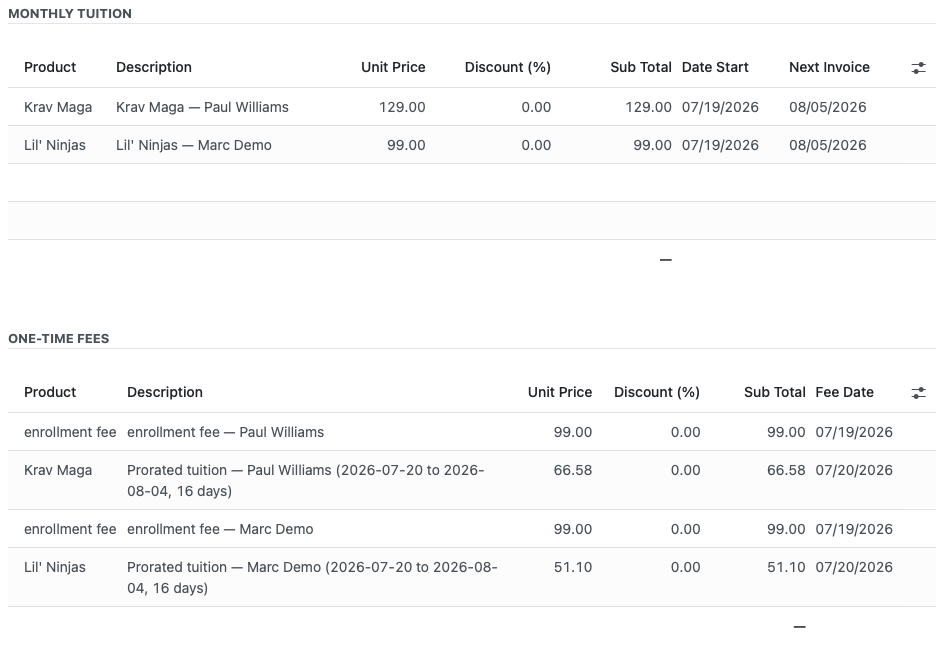
While in draft, you can adjust prices, billing day, and proration. Once the agreement is signed, billing is confirmed and prices are locked.
Billing timeline
Draft agreement
    ↓ Enable Billing
Draft contract created (editable)
    ↓ Review/adjust Billing tab
Sign Agreement
    ↓
Billing confirmed → enrollment fees + proration invoiced immediately
    ↓
Monthly tuition invoiced on each Billing Day (automatic)
There is no separate "Confirm Billing" button - signing the agreement confirms billing.
Proration explained
When a member starts mid-cycle (between billing days), a prorated tuition one-time fee covers the partial period from the start/signing date until the first full billing date.
Example: Billing day is the 15th. Member signs on March 3. Proration covers March 3–14; first full monthly invoice runs March 15.
Check Do Not Prorate on the agreement to skip this charge entirely.
After signing
Once signed:
-
Billing status changes from Draft to confirmed
-
One-time fees and proration are invoiced immediately
-
Monthly tuition lines invoice automatically on each billing day
-
Prices on contract lines are read-only
-
Use the Contract and Invoices smart buttons on the agreement to view details
Viewing invoices
Click the Invoices smart button on the agreement header, or open the linked contract and review invoice history.

Cancelling billing
When you Cancel an agreement:
-
The linked billing contract is stopped
-
No further recurring invoices are generated
-
Existing open invoices remain for collection or write-off
Monthly invoice generation
Recurring invoices are created automatically by Odoo's contract scheduler (typically runs once daily). Your administrator configures the exact schedule.
Each billing day, the system:
-
Creates invoices for all active contracts due that day
-
Posts the invoices to accounting
-
If Payroc is installed and a card is on file, charges the invoice automatically
Editing prices before signing
To change tuition or fees:
-
Ensure the agreement is still Draft and billing is not yet confirmed
-
Edit enrollment prices on the Enrollments tab, or edit contract lines directly on the Billing tab
After signing, price changes require cancelling the agreement or creating an amendment process outside the standard flow.
Common scenarios
|
Scenario |
What to do |
|---|---|
|
Family discount on one student |
Set Discount (%) on the enrollment, or edit the contract line price on Billing tab |
|
Waive enrollment fee |
Set enrollment fee to $0 on enrollment or delete the one-time fee line |
|
Waive proration |
Check Do Not Prorate before signing |
|
Different billing days per family |
Set Billing Day on each agreement individually |
|
Free membership |
Check Complimentary ($0) - no contract is created |
Related guides
-
Signing the Agreement - signing confirms billing and triggers first invoices
-
Card on File & Auto-Pay - automatic payment of invoices